Only about 1% of LinkedIn’s members post content regularly, yet that small group generates a disproportionate share of the

Blog
 By dinwajeeh
August 21, 2026
By dinwajeeh
August 21, 2026
By dinwajeeh
August 21, 2026
Only about 1% of LinkedIn’s members post content regularly, yet that small group generates a disproportionate share of the platform’s weekly engagement. The rest mostly scroll, apply, and connect without ever touching the features built to grow visibility.
LinkedIn Creator Mode was designed to close that gap, but it’s changed more than most people realize since it launched.
Quick answer: LinkedIn removed the standalone Creator Mode toggle in March 2024, and removed profile topic hashtags a month earlier, in February 2024. What’s left is a choice between a content-first profile setup (Follow-first button, prioritized About and Featured sections, LinkedIn Live and newsletter access) and a standard networking-first setup (Connect-first button, traditional layout).
This guide covers what actually changed and how to decide which setup fits your LinkedIn profile and career goals.
What Creator Mode Used to Be
LinkedIn launched Creator Mode in March 2021 to compete for creator attention against platforms like Twitter and Instagram. Turning it on unlocked a specific set of tools, including a Follow button instead of Connect, a content-first profile layout, access to LinkedIn Live, and the ability to publish newsletters.
At the time, this required flipping a dedicated toggle in profile settings, and the features were exclusive to whoever activated it.
What Changed in 2024
LinkedIn phased this out in two steps. In February 2024, it removed the profile topic hashtags that used to appear under a Creator Mode profile’s headline. In March 2024, it removed the toggle itself from profile settings entirely.
The core features, Follow-first button, prioritized About and Featured sections, LinkedIn Live, newsletters, and analytics, were rolled out to all eligible profiles by default rather than staying behind a single on/off switch.
In practice, this means the real decision today isn’t “should I turn Creator Mode on,” but rather “should I configure my profile around content and visibility, or around traditional networking.” The underlying choice is the same; the mechanism just changed.
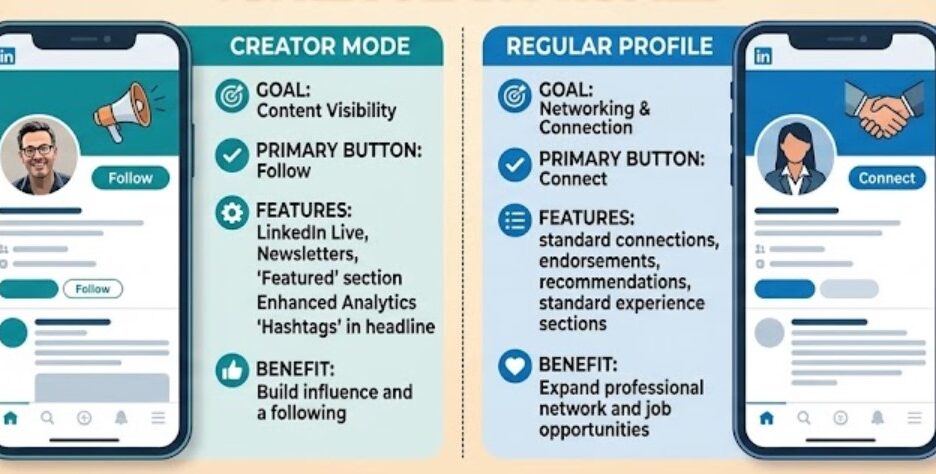
What a Content-First Profile Setup Changes
Configuring your profile the “Creator Mode way” still makes several visible changes:
- “Connect” becomes “Follow” as the primary action button, shifting from mutual connection to one-way following. This now defaults to Follow for eligible profiles unless manually changed back.
- The About section moves to the top of the profile, ahead of work history, making your own description the first thing visitors read.
- Featured content displays prominently, showcasing pinned posts, articles, or newsletters near the top of the profile.
- Access to LinkedIn Live, Audio Events, and newsletters for publishing longer-form or real-time content.
- Deeper content analytics on post performance and audience growth.
Worth noting: the topic hashtags that used to appear under a Creator Mode profile’s headline were removed platform-wide in February 2024, ahead of the toggle itself being retired. If you’ve seen older guides mention “select five topics to display,” that feature no longer exists.
What Stays the Same Either Way
A few things people commonly assume change actually don’t:
- Searchability in recruiter search tools is identical regardless of profile setup.
- Messaging capability works the same; you can message and be messaged either way.
- “Open to Work” visibility is controlled separately and works with either configuration.
Content-First vs Networking-First: Quick Comparison
| Factor | Content-First Setup | Networking-First Setup |
| Primary CTA button | Follow | Connect |
| Best for | Regularly publishing content, building visibility | Direct networking, applying to roles |
| Profile emphasis | About section, Featured posts and articles | Experience, connections, endorsements |
| Recruiter searchability | Unchanged | Unchanged |
| Extra tools available | LinkedIn Live, newsletters, deeper analytics | Standard profile features only |
| Best for job seekers who | Want to demonstrate expertise publicly | Prefer applying and networking privately |
Who Actually Benefits From a Content-First Setup
This setup makes the most sense for a specific type of user, not everyone.
Thought leaders and consultants benefit because the layout is built around content visibility, and a Follow-first button lowers the friction for people who want your updates without a formal connection request.
Job seekers documenting a career transition can benefit too. Posting regularly about a pivot, new skills, or industry insights builds visible credibility.
Freelancers and independent professionals building a personal brand often find the follower-first model matches how they actually want to grow an audience.
Who Should Stick With a Networking-First Setup
Active job seekers applying directly to roles often benefit more from a Connect-first approach, since building genuine two-way connections with recruiters matters more than follower count at this stage.
People not planning to post regularly shouldn’t chase the content-first layout. An empty or rarely updated Featured section can look less polished than a well-organized, traditional profile.
Professionals prioritizing private networking may prefer the lower visibility that comes with a standard setup.
How to Decide: A Simple Test
Ask one honest question: will you actually post content at least once or twice a week for the next few months?
If yes, a content-first setup works in your favor, since it’s designed to showcase exactly that kind of activity.
If the realistic answer is no, a networking-first setup will generally look more complete, since it doesn’t foreground an empty content section.
This isn’t a permanent decision either way. Profile settings can be adjusted at any time without losing existing connections, posts, or history.
FAQs
Is LinkedIn Creator Mode still a separate toggle in 2026?
No. LinkedIn removed the toggle in March 2024, after removing profile topic hashtags the month before. The individual features, Follow-first button, Featured content, LinkedIn Live, are now built into standard profile settings for eligible profiles.
Do LinkedIn profiles still show topic hashtags under the headline?
No. That feature was removed platform-wide in February 2024. Older guides or screenshots referencing “select five topics” reflect the pre-2024 version of Creator Mode, which no longer exists.
Does a content-first LinkedIn setup help you get more job offers?
Not directly. It doesn’t change recruiter searchability. It can indirectly help by showcasing expertise through content, which may lead to more inbound interest, but it isn’t a substitute for a strong resume and active applications.
Does a content-first setup hide your “Open to Work” status?
No. “Open to Work” visibility is controlled separately and can be set to public or recruiters-only regardless of profile setup.
Final Thoughts
The standalone LinkedIn Creator Mode toggle is gone, but the underlying decision it represented, content visibility versus traditional networking, is still very much yours to make within your profile settings.
If you’re building visibility through regular content, a content-first setup works in your favor. If you’re focused on direct applications and private networking, a traditional setup typically presents better.
If you’re not sure which configuration fits your current job search or career stage, Way Up Careers can help you decide based on your specific goals, not a generic recommendation.